|
Important |
|
Apple Pay® is currently only available for Toast platform integrations on Apple’s Safari web browser. |
You can use the hosted checkout integration to accept Apple Pay
payments for orders placed on your registered domains and subdomains. To
make Apple Pay available as a payment method, you need to host the static
domain verification file, and then register and validate your domains to
complete your Apple Pay integration. The iframe, static
domain verification file, and Apple Pay registration must all be on the
same domain for Apple Pay to be available for use in the
iframe.
You can register and validate your domains on the Toast developer portal. The Payment method domains section on the Payment methods page in the Toast developer portal lists all your domains and subdomains and their verification statuses (if applicable). From the Payment method domains section, you can also choose to delete a domain or subdomain.
To accept Apple Pay payments, you must host a static domain verification file at a publicly accessible location on your domain. The static domain verification file needs to be available on each domain and subdomain used for Apple Pay transactions.
|
Important |
|
Host the static domain verification file as raw plain text. Do not apply additional formatting, extensions, or content to the file itself. |
You can download the static domain verification file for your sandbox or production environment below.
-
Sandbox: https://sandbox.eng.toasttab.com/.well-known/ME_sandbox_toast
For information about how to test Apple Pay in a sandbox environment, see Sandbox Testing.
-
Production: https://www.toasttab.com/.well-known/ME_prod_toast
The file is titled apple-developer-merchantid-domain-association. You can rename the file before you upload it to your domain.
Host the static domain verification file at the following path on
your domain:
https://[DOMAIN_NAME]/.well-known/apple-developer-merchantid-domain-association.
To register and verify a domain on the Toast developer portal
-
On the Payment methods page of the Toast developer portal, navigate to the Payment method domains section.
-
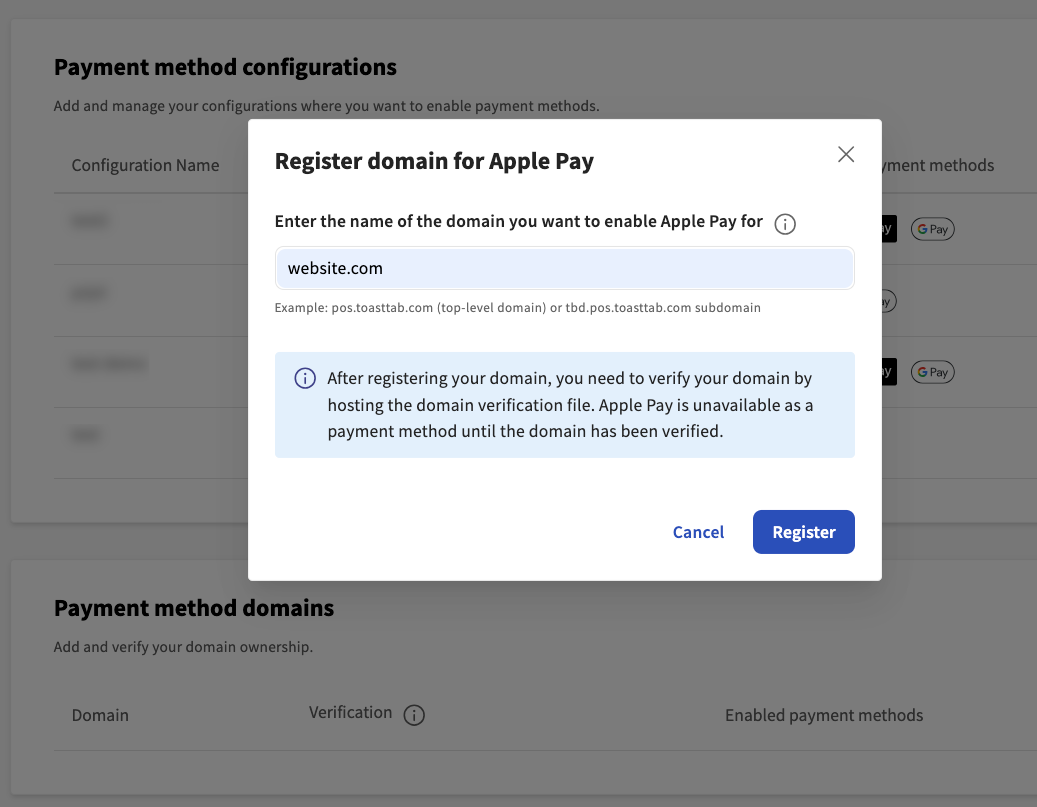
Select the + Add a new domain button to open the Register domain for Apple Pay dialog box.
-
Enter the domain name in the text field.
Note
You can create an unlimited number of payment method domains.
-
Select the Register button. After you register your domain, this creates a payment method domain record. A payment method domain record is the record of your registered domains in the Toast platform. The domain record lists all digital wallets available for use.
-
Go back to the Payment method domains section on the Payment methods page. Your newly registered domain is listed under the Domain heading.
-
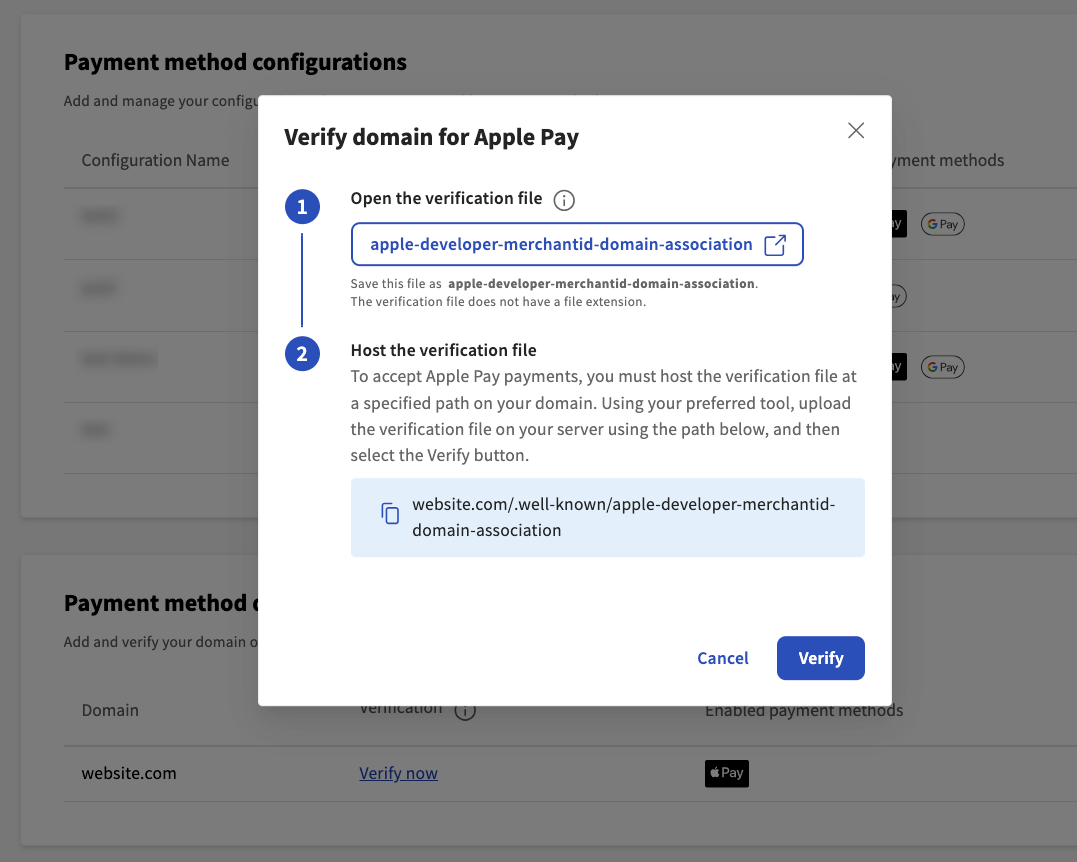
Select the Verify now link next to the domain name to open the Verify domain for Apple Pay dialog box.
-
In the Verify domain for Apple Pay dialog, complete the following actions:
-
Open and save the static verification file at a publicly accessible location on your domain.
-
Host the static verification file at the specified path on your domain. For more information, see Preparing Merchant Domains for Verification.
-
-
Select the Verify button to verify your domain or the Cancel button to close out of the dialog box.
If the verification was successful, the domain displays Apple Pay as an enabled payment method under the Enabled payment methods heading in the Payment method domains section. If the verification was unsuccessful, an error message appears on the Verify domain for Apple Pay dialog. You will be unable to process Apple Pay transactions until Apple successfully validates the file. Make sure that the static verification file was hosted correctly on your domain.
In the Payment method domains section on the Payment methods page of the Toast developer portal, you can delete a domain by selecting the trash icon next to the domain name. This opens the Delete domain dialog box. In the Delete domain dialog box, select the Delete button to delete the domain.
If you choose to delete a payment method domain, the deletion is permanent and the domain cannot be recovered. To enable Apple Pay for the domain, you will need to re-register and verify the domain again.