After you have created a payment intent and attached a payment method, the next step is to confirm the payment intent. Confirming the payment intent represents your customer’s intention to pay the amount with the attached payment method. If the payment intent is successfully confirmed, the hosted checkout client SDK initiates and authorizes the payment.
For more information on how to create a payment intent, see Creating a payment intent. For more information on creating a payment method, see Creating a payment method.
There are two ways to confirm a payment intent. You can choose either:
-
Customer-initiated confirmation: You use the
confirmIntentfunction to initiate a payment based on your customer's actions in the hosted checkoutiframe.Note
The
confirmIntentSDK function can be used to confirm both payment intents and setup intents. -
Integration backend-initiated confirmation: You send a
POSTrequest to the/v1/payment-intents/{paymentIntentId}/confirmendpoint of the payment intents API after you collected your customer’s payment method details. For example, you can use the integration backend-initiated confirmation if your integration allows dine-in orders and needs to auto-close checks at the end of the day or when a customer leaves your restaurant without paying their check.Important
If you collected customer payment information outside the
iframe, you might need to consider regulatory compliance related to the way you store and handle that information. For example, Payment Card Industry Data Security Standard (PCI DSS) regulations might apply to the way you handle customer payment method information. Toast does not provide legal guidance. Make sure you seek legal guidance for regulatory compliance.
After you pass the sessionSecret into the
initialize
SDK function, the SDK function inserts the iframe in a
webpage in your integration. The iframe renders the
keyed-in card input fields in the iframe for the customer
to enter their payment card details. The monitor
function observes customer actions within the iframe. The
monitor function checks that the customer has entered valid
payment card details. If the action has been successfully completed, the
SDK sets the isValid value to true, and your
integration invokes the createPaymentMethod
function to create a payment method. If the payment method was
successfully created, your integration invokes the confirmIntent
function to authorize the payment intent using the payment method
created.
|
Note |
|
If the |
To confirm a payment intent without customer initiation, send a
POST request to the /v1/payment-intents/{paymentIntentId}/confirm
endpoint of the payment intents API to authorize the payment method.
Include the paymentIntentId in the request path. Include
the Toast-Restaurant-External-ID as a header parameter. In
the request body, include the sessionSecret and
paymentMethodId, and the customer's email address if the
email was not provided when the payment intent was created or
updated.
To confirm a payment intent without customer initiation, send a
POST request to the /v1/payment-intents/{paymentIntentId}/confirm
endpoint of the payment intents API to authorize the payment method.
Include the paymentIntentId in the request path. Include
the Toast-Restaurant-External-ID as a header parameter.
In the request body, include the sessionSecret and
paymentMethodId, and the customer's email address if the
email was not provided when the payment intent was created or
updated.
Example request body
{
"paymentMethodId": "f718c101-70e4-45fe-8fc1-67ba0a12a8c5",  "sessionSecret": "PI_86bbcf0c-b483-4bbc-81bf-c 2a9cd2baa2c_SECRET_EqYQ5^CgQWc4J?KBwq2jfv&Ov",
  "email": "john.smith@email.com"
  }
}|
The identifier of the payment method. For more information about payment methods, see Creating a payment method or Getting a list of payment methods attached to a customer record. |
|
|
Used to verify communication in the |
|
|
The customer's email address. The customer's email address only needs to be provided once when you create, update, or confirm the payment intent. |
Example response body
{
"id": "86bbcf0c-b483-4bbc-81bf-c2a9cd2baa2c",
"externalReferenceId": "73edc827-0c18-485f-b581-1ef79f93b940",
"sessionSecret": "PI_86bbcf0c-b483-4bbc-81bf-c2a9cd2baa2c_SECRET_EqYQ5^CgQWc4J?KBwq2jfv&Ov",
"amount": 2000,
"currency": "USD",
"captureMethod": "MANUAL",
"status": "REQUIRES_PAYMENT_METHOD",
"paymentMethodId": "f718c101-70e4-45fe-8fc1-67ba0a12a8c5",
"creationDate": "2023-09-29T16:42:36.239579Z",
"usage": "ON_SESSION",
"customerId": "4b2dfc5a-88a3-11ee-b9d1-0242ac120002",
"amountDetails": {
"tip": 100
},
"email": "john.smith@email.com",
"paymentMethodConfigurationDetails": {
"id": "497f6eca-6276-4993-bfeb-53cbbbba6f08"
},
"latestPayment": {
"card": {
"brand": "VISA",
"lastFour": "1111",
"expiry": {
"month": "12",
"year": "27"
}
}
},
"offSession": false,
"standingInstructionType": null,
"mandateId": null
"lastPaymentError": {  "type": "CARD_DECLINED",
  "code": "DECLINE"
  }
}
}
}|
The unique identifier of the payment intent. |
|
|
The status of the payment intent. For more information, see Payment intent statuses. |
|
|
Payment card details associated with the latest payment intent. |
|
|
Details about the payment card transaction failure. The
|
|
|
The type of payment card error. Available values are:
|
|
|
Additional information about why the payment card was declined. |
Similar to keyed-in and saved card transactions, confirm a setup
intent for future merchant-initiated transactions, by sending a
POST request to the /v1/payment-intents/{paymentIntentId}/confirm
endpoint of the payment intents API to authorize the payment
method.
Confirming the payment intent securely stores the customer’s
payment card as a card-on-file. A card-on-file can be used for
merchant-initiated transactions, like deposits on catering orders. To
use a card-on-file for a merchant-initiated transaction, the customer
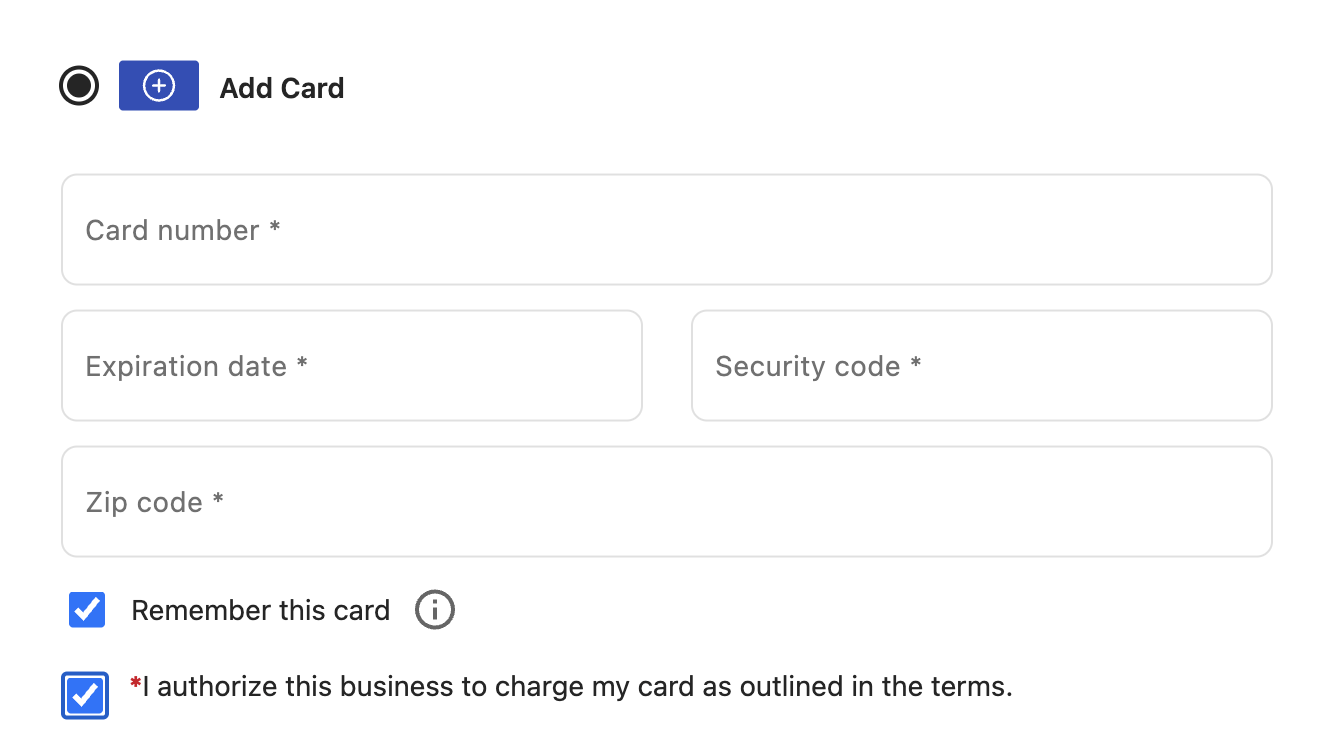
must have checked the I authorize this business to charge my
card as outlined in the terms checkbox in the
iframe during a previous transaction.
If the customer also selects the Remember this
card checkbox in the iframe, this stores and
saves the payment card to the customer profile. The payment card can
be used for both customer and merchant-initiated transactions.
Include the paymentIntentId in the request path.
Include the Toast-Restaurant-External-ID as a header
parameter. In the request body, include the sessionSecret
and paymentMethodId, and the customer's email address if
the email was not provided when the payment intent was created or
updated.
There are multiple ways to retrieve the
paymentMethodId to include in the request body:
-
Retrieve the
paymentMethodIdby sending aGETrequest to the/v1/customers/{id}/payment-methodsendpoint of the customers API. -
Retrieve the
paymentMethodIdfrom theCreatePaymentMethodResultEventContentif the payment method was successfully created using thecreatePaymentMethodfunction. -
Retrieve the
paymentMethodIdfrom thePaymentMethodResponseif the payment method was successfully created using the create payment method API endpoint.
|
Note |
|
If the payment method associated with the payment intent is a
saved payment card, you must include the |
Example request body
{
    "paymentMethodId": "f718c101-70e4-45fe-8fc1-67ba0a12a8c5",
    "sessionSecret": "PI_a9c8a2b0-a824-46df-a6dc-4415c556df94_SECRET_JT!M!YA4zL1yxrGHnC6PrYTQX",
    "customerId": "611c1e47-8ba3-457b-8879-196da2c427ff",
    "email": "john.smith@email.com"
}|
The identifier of the payment method. For more information about payment methods, see Creating a payment method or Getting a list of payment methods attached to a customer record. |
|
|
Used to verify communication in the |
|
|
The customer's email address. The customer's email address only needs to be provided once when you create, update, or confirm the payment intent. |
If the payment intent was successfully confirmed, the payment
intents API returns a PaymentIntentResponse that contains
the mandateId required to create a merchant-initiated
transaction.
Example response body
{
    "id": "a9c8a2b0-a824-46df-a6dc-4415c556df94",
    "externalReferenceId": "73edc827-0c18-485f-b581-1ef79f93b940",
    "sessionSecret": "PI_a9c8a2b0-a824-46df-a6dc-4415c556df94_SECRET_JT!M!YA4zL1yxrGHnC6PrYTQX",
    "amount": 2000,
    "currency": "USD",
    "captureMethod": "MANUAL",
    "status": "REQUIRES_CAPTURE",
    "paymentMethodId": "f718c101-70e4-45fe-8fc1-67ba0a12a8c5",
    "creationDate": "2023-09-29T16:42:36.239579Z",
    "customerId": "611c1e47-8ba3-457b-8879-196da2c427ff",
    "amountDetails": {
        "tip": 100
    },
    "email": "john.smith@email.com",
    "paymentMethodConfigurationDetails": {
        "id": "497f6eca-6276-4993-bfeb-53cbbbba6f08"
    },
    "latestPayment": {
        "card": {
             "brand": "VISA",
             "lastFour": "1111",
             "expiry": {
                 "month": "12",
                 "year": "27"
             }
         }
    },
    "standingInstructionType": "RECURRING"
    "offSession": false,
    "mandateId": "d1bc0870-b8e9-44ee-9a49-7d6c416305cc"
}|
The unique identifier of the payment intent. |
|||
|
The status of the payment intent. For more information, see Payment intent statuses. |
|||
|
Payment card details associated with the latest payment intent. |
|||
|
The identifier of the mandate. The The
|