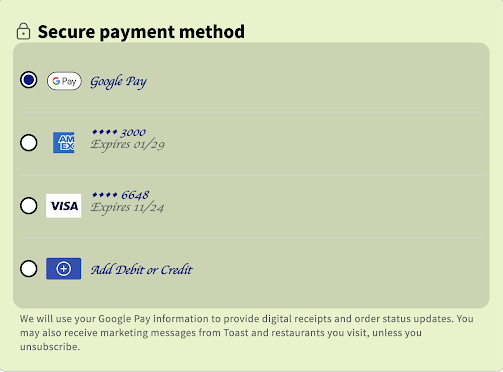
You can customize your hosted checkout integration
iframe to match your Toast location's style and branding.
You can modify the following parameters when you initialize the SDK. For
more information, see SDK functions.
-
backgroundColor -
color -
fontFamily -
fontSize -
fontWeight -
iconColor -
lineHeight -
letterSpacing -
padding -
textAlign
SDK customization parameters
const checkoutForm = window.Toast(
checkoutForm.initialize(
  () => { console.log("Successful initialization callback"),
  () => { console.log("Failed initialization callback"),
  {
    merchantId: "e5421b10-cd5c-41ca-9791-0a5037e81cdc",
    oauthToken: "hosted-checkout-oauth-token",
    sessionSecret: "30b72c74-ab3d-4354-8d3e-8824bcdeecea",
    domElementId: "payment-frame"
  },
  {
    backgroundColor: "#63000A",
    color: "#D4AF37",
    iconColor: "#D4AF37",
    fontFamily: "Snell Roundhand, cursive",
    fontSize: "18px",
    fontWeight: 700,
    fontStyle: "italic",
    textAlign: "center",
    letterSpacing: "6px",
    padding: '9px'
  }
)
The following image shows a customized iframe on a
checkout page.