|
Note |
|
To create a payment intent, the Toast POS location has to enable the integration with your hosted checkout provider on the Integrations page in Toast Web. The location has to enable the integration even if your hosted checkout integration is developed by the organization itself. |
You can create a payment intent for the following transaction types:
If the payment intent is successfully created, the payment intents
API returns a PaymentIntentResponsesessionSecret string. The sessionSecret is used
to verify communication between your integration and the Toast platform in
the iframe. You need to pass an active
sessionSecret to the client-side of your application in order
to initialize and display the hosted checkout iframe and to
create and confirm payments.
|
Note |
|
The payment intent expires after 180 days. If the payment intent
has expired, you need to create a new payment intent. When you create a
new payment intent, this creates a new, corresponding
|
|
Note |
|
Do not make this request from the ordering interface client browser. You send hosted checkout integration API requests from a server component of your integration. |
For a keyed-in card transaction, the customer manually enters payment card details into card input fields for authorization. When the customer places an order, they enter their payment card details and submit the payment to complete the order.
To create a payment intent for keyed-in card transactions, send a
POST request to the /v1/payment-intents
endpoint of the payment intents API to return a PaymentIntentResponse
object. Include the Toast-Restaurant-External-ID as a
header parameter in the request to specify the GUID of the Toast POS
location that you are creating a payment intent for.
You can also include a paymentMethodConfigurationId
value to enable a custom payment method configuration. A payment method
configuration allows you to present various payment methods in your
hosted checkout iframe. If you do not include a
paymentMethodConfigurationId, your integration uses the
default payment method configuration. The default payment method
configuration only enables Google
Pay®, keyed-in card, and saved card payment methods.
You can add, view, and manage payment method configurations on the Payment methods page in the Toast developer portal. For more information, see Managing payment method configurations.
|
Note |
|
If the hosted checkout integration fails to retrieve your
payment method configuration, the |
Example request body
{
"amount": 1000,  "currency": "USD",
  "externalReferenceId": "73edc827-0c18-485f-b581-1ef79f93b940",
  "captureMethod": "MANUAL",
"email": "john.smith@email.com",
"captureMethod": "MANUAL",
"email": "john.smith@email.com",  "paymentMethodConfigurationId": "497f6eca-6276-4993-bfeb-53cbbbba6f08",
  "paymentMethodId": "f718c101-70e4-45fe-8fc1-67ba0a12a8c5"
  }
}|
The payment amount in minor units represented as a positive
integer. The minimum amount is |
|||
|
The supported currency types are:
|
|||
|
The identifier for the payment intent generated by the Toast
POS location or your integration. The
|
|||
|
The customer's email address. The customer's email address only needs to be provided once when you create, update, or confirm the payment intent. |
|||
|
(Optional) The identifier of the payment method
configuration. The |
|||
|
(Optional) The identifier of the payment method associated with the payment intent. For more information, see Getting a list of payment methods attached to a customer record. |
Example response body
{
"id": "86bbcf0c-b483-4bbc-81bf-c2a9cd2baa2c",
"externalReferenceId": "73edc827-0c18-485f-b581-1ef79f93b940",
"sessionSecret": "PI_86bbcf0c-b483-4bbc-81bf-c2a9cd2baa2c_SECRET_EqYQ5^CgQWc4J?KBwq2jfv&Ov",
"amount": 1000,
"currency": "USD",
"captureMethod": "MANUAL",
"status": "REQUIRES_PAYMENT_METHOD",
"paymentMethodId": "f718c101-70e4-45fe-8fc1-67ba0a12a8c5",
"creationDate": "2023-09-29T16:42:36.239579Z",
"usage": null,
"customerId": null,
"amountDetails": {
"tip": 0
},
"email": "john.smith@email.com",
"paymentMethodConfigurationDetails": {  "id": "497f6eca-6276-4993-bfeb-53cbbbba6f08"
},
"latestPayment": null,
"id": "497f6eca-6276-4993-bfeb-53cbbbba6f08"
},
"latestPayment": null,  "offSession": false,
"standingInstructionType": null,
"mandateId": null
}
"offSession": false,
"standingInstructionType": null,
"mandateId": null
}|
The identifier of the payment intent. You use this identifier to update the payment intent. For more information, see Updating a payment intent. |
|
|
The identifier for the payment intent generated by the Toast
POS location or your integration. The
|
|
|
A unique identifier for the payment intent that you use to create a payment method. |
|
|
The status of the payment intent. Values are:
For more information, see Payment intent statuses. |
|
|
The date and time the payment intent was created in ISO 8601
format. Toast support recommends that you store the
|
|
|
Used to determine if the customer will save the payment
method for future use. If the payment method can only be used one
time, the response returns a
|
|
|
The |
|
|
The |
|
Note |
|
To initiate the saved cards transaction workflow, your customer
must be signed into their profile in your integration. This allows you
to include the |
Saved card transactions use payment cards that have been stored for future use by a customer. For more information, see Setup intents. To allow a customer to use their saved cards, you must create a customer record. For more information, see Creating a customer record.
The following procedure is a high-level overview of how to create a payment intent for a saved card transaction:
-
Use your Payment credentials to send a
POSTrequest to the/v1/customersendpoint of the customers API to create a customer record. This returns acustomerId. -
Send a
POSTrequest to the/v1/payment-intentsendpoint of the payment intents API and include the customerIdin the request body. This returns aPaymentIntentResponseobject.
|
Note |
|
Do not make the request to create a payment intent for a saved card transaction from the ordering interface client browser. You send hosted checkout integration API requests from a server component of your integration. |
To create a payment intent for saved card transactions, send a
POST request to the /v1/payment-intents
endpoint of the payment intents API. Include the customerId
in the request body and the Toast-Restaurant-External-ID as
a header parameter. You can also include a
paymentMethodConfigurationId value to enable a custom
payment method configuration. For more information, see Managing payment method configurations.
The saved cards transaction workflow displays the
Remember this card checkbox in the hosted checkout
iframe. Customers can then choose to checkout with a saved
card or choose to enter their payment card details and then select the
Remember this card checkbox to save the payment
card to their customer profile.
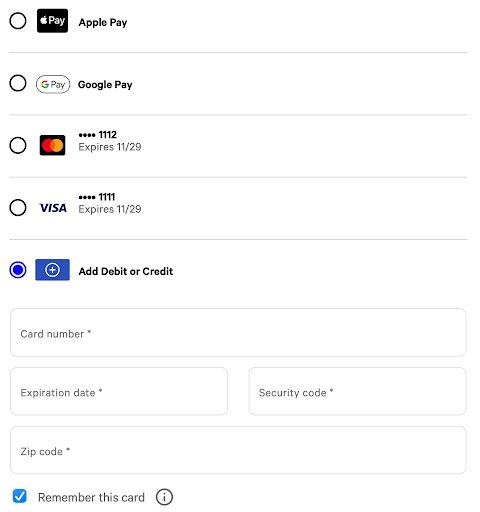
If your customer signs into their profile after the payment intent
was created, send a POST request to update the payment
intent with the customerId. This allows the
iframe to detect and initiate the save cards transaction
workflow. For more information, see Updating a payment intent.
Example request body
{
    "amount": 1000,
    "currency": "USD",
    "externalReferenceId": "73edc827-0c18-485f-b581-1ef79f93b940",
    "captureMethod": "MANUAL",
    "customerId": "4b2dfc5a-88a3-11ee-b9d1-0242ac120002",
    "email" : "john.smith@email.com",
    "paymentMethodConfigurationId": "497f6eca-6276-4993-bfeb-53cbbbba6f08",
    "paymentMethodId": "f718c101-70e4-45fe-8fc1-67ba0a12a8c5"
}|
The identifier for the payment intent generated by the Toast
POS location or your integration. The
|
|||
|
The identifier for the customer record that identifies the customer in the Toast platform and allows them to choose from payment cards saved to their profile. |
|||
|
The customer's email address. |
Example response body
{
    "id": "86bbcf0c-b483-4bbc-81bf-c2a9cd2baa2c",
    "externalReferenceId": "73edc827-0c18-485f-b581-1ef79f93b940",
    "sessionSecret": "PI_86bbcf0c-b483-4bbc-81bf-c2a9cd2baa2c_SECRET_EqYQ5^CgQWc4J?KBwq2jfv&Ov",
    "amount": 1000,
    "currency": "USD",
    "captureMethod": "MANUAL",
    "status": "REQUIRES_PAYMENT_METHOD",
    "paymentMethodId": "f718c101-70e4-45fe-8fc1-67ba0a12a8c5",
    "creationDate": "2023-09-29T16:42:36.239579Z",
    "usage": null,
    "customerId": "4b2dfc5a-88a3-11ee-b9d1-0242ac120002",
    "amountDetails": {
        "tip": 0
    },
    "email": "john.smith@email.com",
    "paymentMethodConfigurationDetails": {
        "id": "497f6eca-6276-4993-bfeb-53cbbbba6f08"
    },
    "latestPayment": null,
    "offSession": false,
    "standingInstructionType": null,
    "mandateId": null
}|
The identifier of the payment intent. |
|
|
A unique identifier for the payment intent that you use to create a payment method. |
|
|
The status of the payment intent. For more information, see Payment intent statuses. |
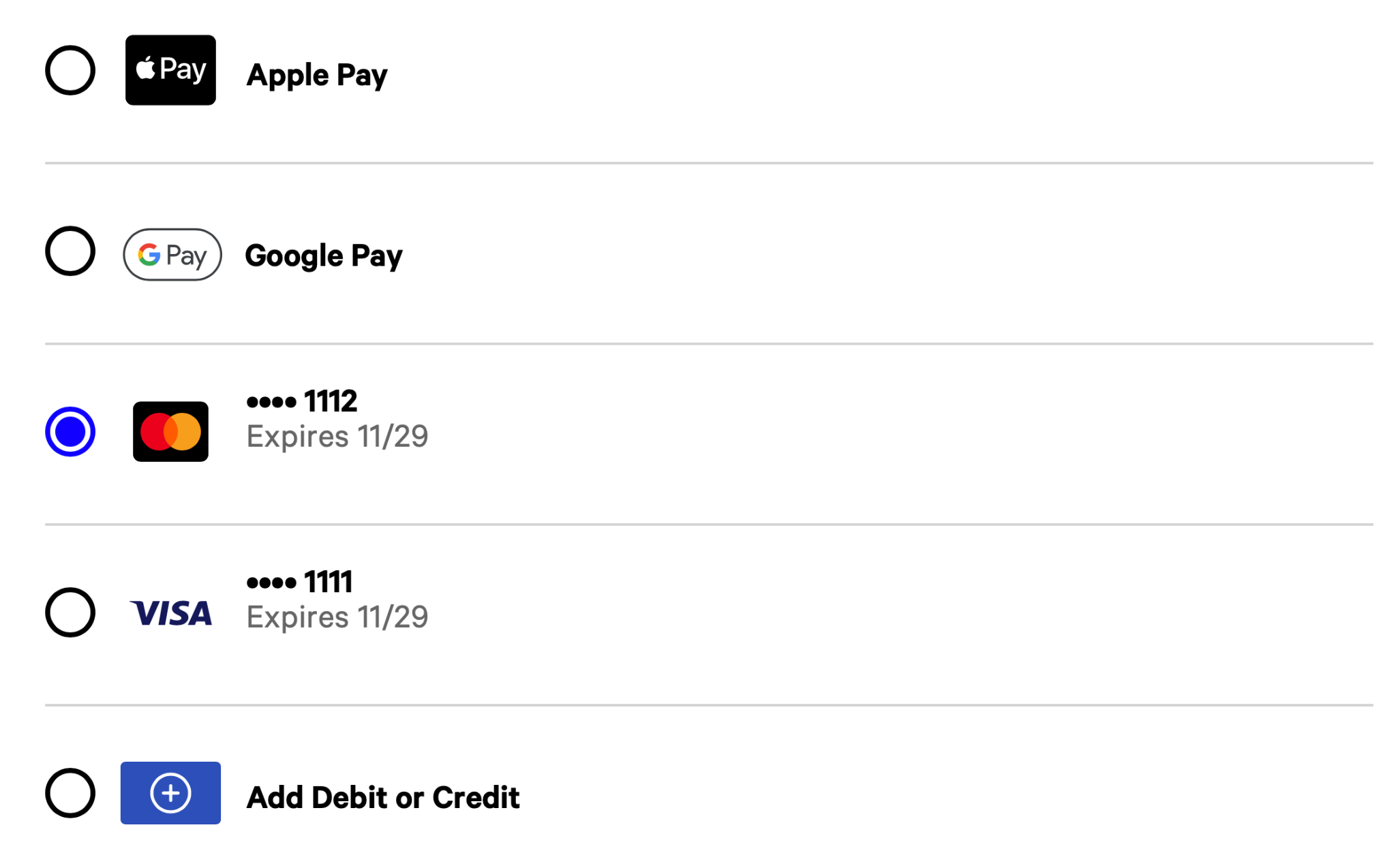
The response contains a payment intent and
sessionSecret and initializes and loads the
iframe onto your checkout page. In the iframe,
the customer can see and select from their saved cards to use as a
payment method.
To complete a merchant-initiated transaction, you must first complete a customer-initiated payment or setup intent transaction where the customer is actively participating. The customer must authorize the payment card for future use during this transaction.
To create a payment intent that saves the payment method for
merchant-initiated transactions, send a POST request to the
/v1/payment-intents
endpoint of the payment intents API to return a PaymentIntentResponse
object. Include the Toast-Restaurant-External-ID as a
header parameter in the request to specify the GUID of the Toast POS
location that you are creating a payment intent for. Set the
offSession value to false to indicate that
this is a customer-initiated transaction as part of the
merchant-initiated transaction workflow.
In the request body, provide a value for the
standingInstructionType. The
standingInstructionType is the instruction type used by the
merchant and sent to the payment processor. Choose from one of the
following values:
-
RECURRING: A series of set payments that are charged at regular intervals. For example, use recurring payments for a monthly wine club subscription. -
INSTALLMENT: The total purchase amount is split into a fixed number of periodic payments. For example, use installment payments to pay for a wedding cake, where the cake is paid off in five installments. -
UNSCHEDULED: A single merchant-initiated payment. For example, use an unscheduled payment for a restaurant reservation fee.
You can also include a paymentMethodConfigurationId
value to enable a custom payment method configuration. For more
information, see Managing payment method configurations.
Example request body
{
"amount": 1000,
"currency": "USD",
"externalReferenceId": "73edc827-0c18-485f-b581-1ef79f93b940",
"captureMethod": "MANUAL",
"email" : "john.smith@email.com",
"offSession": false,
"standingInstructionType": "RECURRING",
"paymentMethodConfigurationId": "497f6eca-6276-4993-bfeb-53cbbbba6f08",
"paymentMethodId": "f718c101-70e4-45fe-8fc1-67ba0a12a8c5"  }
}|
The payment amount in minor units represented as a positive
integer. The minimum amount is |
|||
|
The supported currency types are:
|
|||
|
The identifier for the payment intent generated by the Toast
POS location or your integration. The
|
|||
|
Controls when funds are captured from the customer's bank account.
|
|||
|
The customer's email address. The customer's email address only needs to be provided once when you create, update, or confirm the payment intent. |
|||
|
Used to determine if the transaction is a customer-initiated transaction or a merchant-initiated transaction.
|
|||
|
The type of merchant-initiated recurring transaction. Values are:
|
|||
|
(Optional) The identifier of the payment method
configuration. The |
|||
|
(Optional) The identifier of the payment method associated with the payment intent. For more information, see Getting a list of payment methods attached to a customer record. |
Example response body
{
    "id": "a9c8a2b0-a824-46df-a6dc-4415c556df94",
    "externalReferenceId": "73edc827-0c18-485f-b581-1ef79f93b940",
    "sessionSecret": "PI_a9c8a2b0-a824-46df-a6dc-4415c556df94_SECRET_JT!M!YA4zL1yxrGHnC6PrYTQX",
    "amount": 100,
    "currency": "USD",
    "captureMethod": "MANUAL",
    "status": "REQUIRES_PAYMENT_METHOD",
    "creationDate": "2025-11-19T20:04:33.052477879Z",
    "customerId": null,
    "amountDetails": {
       "tip": 100
    },
    "email": "john.smith@email.com",
    "paymentMethodConfigurationDetails": {
        "id": "5855c2ae-e3aa-45d9-b78d-88fafacf0ec2"
    },
    "standingInstructionType": "RECURRING",
    "latestPayment": null,
    "offSession": false,
    "mandateId": null
}