|
Note |
|
Currently, the allergens feature is only available for Toast Tables. For more information, see this Toast Support article. |
On the Toast Tables page in Toast Web, you can configure your reservation settings and enable the Allergens setting. The setting lets your guests choose from a list of allergens when they book a reservation.
To configure guest allergens
-
Go to Waitlist & Reservations > Settings > General > Reservation form to open the Allergens section.
-
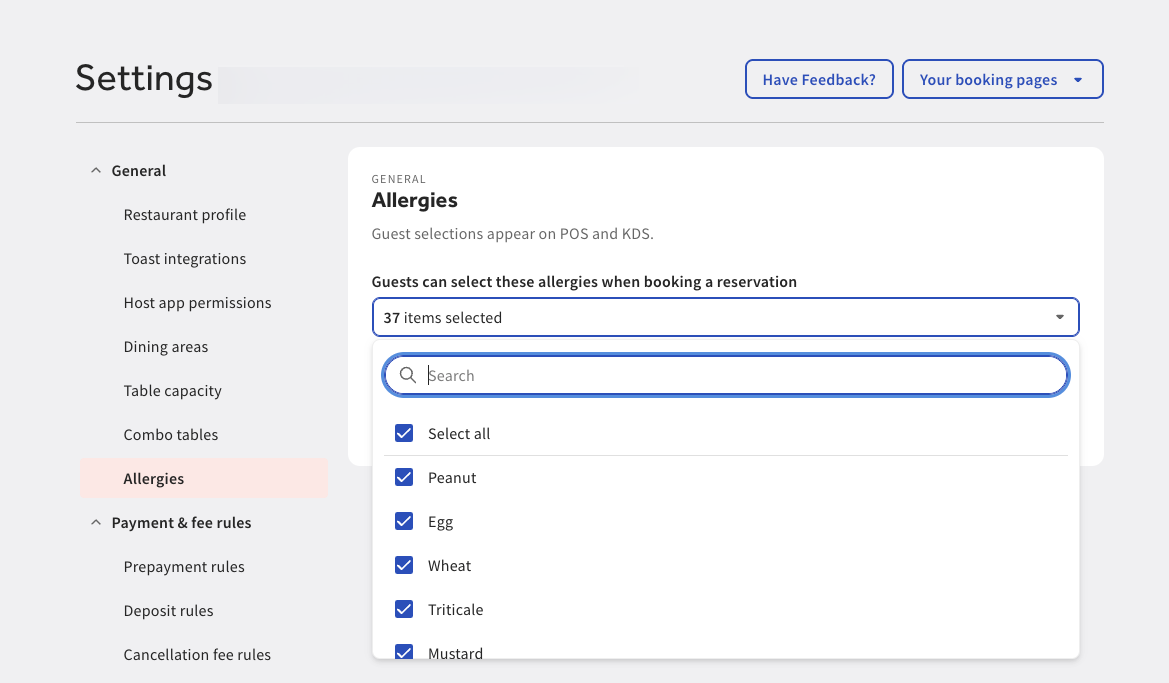
Under the Allergens section, use the drop-down menu to select the allergens guests can choose from when booking a reservation.
Note
If you choose to add an allergen not listed, the allergen will be available for your guest to choose from when making a reservation, however that allergen will not appear on kitchen tickets.
-
Select the Save changes button to save your changes.
-
Go to the Toast account > Publishing > Publishing center page to publish your changes. For more information, see Publishing center overview.
Your guests will be able to choose from a pre-selected list of allergens when they book a reservation on Toast Tables.