Marketplace facilitator orders allow ordering services to send orders
to the Toast platform with pricing, discounts, and taxes calculated by the
ordering service and not by the Toast platform. The orders API treats an
order as a marketplace facilitator order when it includes a
marketplaceFacilitatorTaxInfo object; without that object, the
order is priced and processed as a standard order. Use marketplace
facilitator orders when your orders service is responsible for tax
collection. For more information, see Marketplace facilitator tax information.
The following sections describe marketplace facilitator orders where your
ordering service provides prices and taxes. These orders include a
taxes list in the marketplaceFacilitatorTaxInfo
object and an externalPriceAmount value for every selection
and modifier. Marketplace facilitator orders that use the
facilitatorCollectAndRemitTaxOrder value instead are priced
by the Toast platform and follow the standard discount rules. Those orders
must not include externalPriceAmount values.
Marketplace facilitator orders support item-level and check-level discounts. Item-level discounts apply to a single menu item. Check-level discounts apply to the entire order.
|
Note |
|
Discounts on marketplace facilitator orders are available only to
ordering services that Toast has enabled for this feature. If your
ordering service is not enabled, orders that include
|
Discount data that you include in marketplace facilitator orders appears directly in Toast platform reports. Make sure discount information is accurate since the Toast platform stores this data exactly as provided, without validating or recalculating it.
For information about how check-level discounts are applied in marketplace facilitator orders, see Calculating check-level discounts for marketplace facilitator orders.
To create a marketplace facilitator order, create an order using the
orders API, the same way you create any order. Include a
marketplaceFacilitatorTaxInfo object with your calculated
taxes, and include an externalPriceAmount value for every
selection and modifier. For
guidance on creating orders, see Submitting your first order to the orders API. If your order
includes a discount, include the discount data described in Order object requirements for marketplace facilitator
orders. To authorize
requests to the orders API, you need the
orders.selection_price_tax_override:write and
orders.orders:write Scopes.
The orders API /void endpoint supports canceling orders
that include marketplace facilitator discounts. For more information, see
Void an order.
For more information about the orders API, see the orders API reference documentation.
For more information about limitations and error handling, see Limitations and Error handling.
Marketplace facilitator orders require specific values on the
Order, Check, and Selection objects
so the Toast platform can accurately represent your pricing and taxes.
Which values are required depends on whether your order includes totals
or a discount.
The following sections list the required values for each type of order.
If your order includes only item prices and taxes, include the following values.
-
Selection-
externalPriceAmount
-
-
Modifiers (
Selectionobjects in amodifierslist)-
externalPriceAmount
-
-
MarketplaceFacilitatorTaxInfo-
taxes
-
If your order includes any totals or price values in addition to
externalPriceAmount, such as price,
netAmount, or totalAmount, include all of the
following values. The values must add up. For example, the check
netAmount must equal the sum of all selection
price values.
-
Order-
totalAmount -
netAmount
-
-
Check-
totalAmount -
netAmount
-
-
Selection-
externalPriceAmount -
price -
menuItemPrice
-
-
Modifiers (
Selectionobjects in amodifierslist)-
externalPriceAmount -
price -
menuItemPrice
-
-
MarketplaceFacilitatorTaxInfo-
taxes
-
If your order includes any discount, include the following values.
-
Order-
totalDiscountAmount -
preDiscountAmount -
totalAmount -
netAmount
-
-
Check-
totalDiscountAmount -
preDiscountAmount -
totalAmount -
netAmount
-
-
Selection(every selection)-
preDiscountPrice -
externalPriceAmount -
price -
menuItemPrice
-
-
Modifiers (
Selectionobjects in amodifierslist)-
externalPriceAmount -
price -
menuItemPrice
-
-
MarketplaceFacilitatorTaxInfo-
taxes
-
-
AppliedDiscount-
name -
discountAmount -
nonTaxDiscountAmount
-
Some values depend on the type of discount:
-
If your order includes a check-level discount, include the
discountAmountvalue on theOrderandCheckobjects. If your order includes only item-level discounts, these values must be zero. Otherwise, the order fails with error23076: Order.discountAmount value should be zero. Order does not have any discountsor23076: Check.discountAmount value should be zero. Check does not have any discounts. -
If your order includes an item-level discount, include the
discountvalue on each discountedSelectionobject.
| Parent object | Value | How the Toast platform uses this value |
|---|---|---|
Selection |
discount |
Per-item discount decimal amount, excluding
check-level discounts. Tax-exclusive. Must equal the
item-level AppliedDiscount
nonTaxDiscountAmount for the selection.
|
Selection |
preDiscountPrice |
Item price before any discounts are applied, excluding tax. This value represents the total for the selection including all quantities. |
Selection |
price |
Item price after discounts are applied, including modifiers and excluding tax. This value represents the total for the selection including all quantities. For example, if you have five pizzas priced at $10.00 each with a $1 discount per pizza, you'd have Pizzas (5) × $9.00 (unit price after discounts) = $45.00. |
Selection |
menuItemPrice |
Menu item price before any calculations, such as quantity adjustments, modifiers, discounts, or taxes. |
Selection |
externalPriceAmount |
Menu item price calculated outside the Toast platform, excluding tax, discounts, and modifier adjustments. This value represents the total for the selection including all quantities. For example, if you have five pizzas priced at $10.00 each, this would be Pizzas (5) × $10.00 (menu item unit price) = $50.00. |
AppliedDiscount |
name |
Discount name. Locations see this name in reporting.
Include the name of your ordering service and the promotion
name (like
“[ordering service name] $1 off
promo”) to help teams identify discounts. Maximum 255
characters.
|
AppliedDiscount |
discountAmount |
Total discount amount, inclusive of tax. |
AppliedDiscount |
nonTaxDiscountAmount |
Discount amount, excluding tax. For item-level
discounts, must equal the selection discount.
For check-level discounts, must equal the check
discountAmount.
|
Check |
discountAmount |
Check-level discount. Tax-exclusive. Must equal the
nonTaxDiscountAmount value of the
AppliedDiscount object.
|
Check |
totalDiscountAmount |
Tax-exclusive total for the check. Sum of the check
discountAmount plus every selection
discount on the check.
|
Check |
preDiscountAmount |
Sum of all pre-discount prices for all items on the check. |
Check |
netAmount |
Sum of all item prices, including modifiers and discounts, but excluding tax. |
Check |
totalAmount |
Sum of the net amount, tax, tip, and gratuities. |
Order |
discountAmount |
Sum of all check-level discounts only, excluding tax. |
Order |
totalDiscountAmount |
Tax-exclusive total discount for the entire order. For
a single check, this equals that check's
totalDiscountAmount.
|
Order |
preDiscountAmount |
Sum of all pre-discount prices for all items on the order. |
Order |
netAmount |
Sum of an order’s item prices, including modifiers and discounts, but excluding tax. |
Order |
totalAmount |
Sum of the net amount, tax, tip, and gratuities. |
The order object example shown below is a marketplace facilitator order.
A marketplace facilitator order with a check-level discount
{
"diningOption": {
"guid": "6d164958-22ee-43c2-a2b0-157bb576530b"
},
"customer": {
"guid": "a1b2c3d4-e5f6-7890-abcd-ef1234567890"
},
"checks": [
{
"selections": [
{
"item": {
"guid": "0b5aec4b-1388-40fb-9714-e42480809077"
},
"itemGroup": {
"guid": "009e0dd4-263d-4847-9c83-9df896d8191c"
},
"quantity": 1,
"appliedDiscounts": [
{
"name": "External Selection Discount",
"discountAmount": 2.0,
"nonTaxDiscountAmount": 2.0
}
],
"discount": 2.0,  "menuItemPrice": 15.0,
"externalPriceAmount": 15.0,
"preDiscountPrice": 15.0,
"price": 10.0
},
{
"item": {
"guid": "159b6eed-5ee4-445b-b31d-eda4c6ba1981"
},
"itemGroup": {
"guid": "ef687ea1-e73d-4fdc-9606-55be653bf1de"
},
"quantity": 1,
"menuItemPrice": 5.0,
"externalPriceAmount": 5.0,
"preDiscountPrice": 5.0,
"price": 4.0
}
],
"appliedDiscounts": [
{
"name": "External Check Discount",
"discountAmount": 4.0,
"nonTaxDiscountAmount": 4.0
}
],
"discountAmount": 4.0,
"menuItemPrice": 15.0,
"externalPriceAmount": 15.0,
"preDiscountPrice": 15.0,
"price": 10.0
},
{
"item": {
"guid": "159b6eed-5ee4-445b-b31d-eda4c6ba1981"
},
"itemGroup": {
"guid": "ef687ea1-e73d-4fdc-9606-55be653bf1de"
},
"quantity": 1,
"menuItemPrice": 5.0,
"externalPriceAmount": 5.0,
"preDiscountPrice": 5.0,
"price": 4.0
}
],
"appliedDiscounts": [
{
"name": "External Check Discount",
"discountAmount": 4.0,
"nonTaxDiscountAmount": 4.0
}
],
"discountAmount": 4.0,  "totalDiscountAmount": 6.0,
"preDiscountAmount": 20.0,
"netAmount": 14.0,
"totalAmount": 22.0
}
],
"marketplaceFacilitatorTaxInfo": {
"taxes": [
{
"name": "External Tax",
"taxAmount": 8.0,
"facilitatorCollectAndRemitTax": false
}
]
},
"discountAmount": 4.0,
"totalDiscountAmount": 6.0,
"preDiscountAmount": 20.0,
"netAmount": 14.0,
"totalAmount": 22.0
}
"totalDiscountAmount": 6.0,
"preDiscountAmount": 20.0,
"netAmount": 14.0,
"totalAmount": 22.0
}
],
"marketplaceFacilitatorTaxInfo": {
"taxes": [
{
"name": "External Tax",
"taxAmount": 8.0,
"facilitatorCollectAndRemitTax": false
}
]
},
"discountAmount": 4.0,
"totalDiscountAmount": 6.0,
"preDiscountAmount": 20.0,
"netAmount": 14.0,
"totalAmount": 22.0
}|
The |
|
|
The |
For marketplace facilitator orders, you calculate how a check-level discount is distributed among menu items and submit the distributed amounts. The Toast platform does not calculate this distribution for you; it only validates that the values you submit are consistent. The following procedure describes how to distribute a check-level discount among menu items, based on each item’s percentage of the check total.
To calculate a check-level discount
-
Total the pre-discount amounts of all the menu items in a check.
-
Calculate what percentage each menu item represents of the check total.
-
Apply the discount to the check total based on calculated percentages.
The example below further describes how check-level discounts are applied to a check.
Example check-level discount
For this example, there is a check with two menu items, one that is $15.00 and one that is $5.00, and there is a check discount of $4.00.
-
Total the pre-discount amounts of all the menu items in a check.
-
Menu item 1: $15.00 (pre-discount price)
-
Menu item 2: $5.00 (pre-discount price)
-
Pre-discount check total: $20.00
-
-
Calculate what percentage each menu item represents of the check total.
-
Menu item 1: $15.00 / $20.00 = 75%
-
Menu item 2: $5.00 / $20.00 = 25%
-
-
Apply the discount to the check total based on calculated percentages.
-
Menu item 1: $4.00 x 75% = $3.00
Since Menu item 1 makes up 75% of the check total, it receives 75% of the check discount.
-
Menu item 2: $4.00 x 25% = $1.00
Since Menu item 2 makes up 25% of the check total, it receives 25% of the check discount.
-
The Toast platform validates that the per-item values you submit are consistent with your check-level discount, and rejects the order if they aren’t. The following lists describe how the discount applies to each menu item in the example above, so you can produce values that pass validation.
|
Note |
|
Check-level discounts can only reduce top-level menu item prices, not modifier prices. If you apply a discount to a modifier, the Toast platform rejects the order. |
Menu item 1
-
Original price: $15.00 (75% of the check total)
-
Check discount (75%): $3.00 ($4.00 x 75%)
-
Price after discount: $12.00 ($15.00 - $3.00)
Menu item 2
-
Original price: $5.00 (25% of the check total)
-
Check discount (25%): $1.00 ($4.00 x 25%)
-
Price after discount: $4.00 ($5.00 - $1.00)
Sometimes an option a guest selects should reduce an item’s price rather than add to it — for example, a chicken caesar salad ordered with no chicken. To represent this, marketplace facilitator orders support negatively-priced items and modifiers: the modifier’s negative price reduces the cost of the item it’s attached to.
The following rules apply to negatively-priced items and modifiers in marketplace facilitator orders:
-
An order can include negatively-priced items and negatively-priced modifiers.
-
You can discount a top-level menu item that has a negatively-priced modifier.
-
You cannot discount a top-level menu item that is itself negatively priced.
-
Every check total and order total must be positive or zero.
Whether a discount value includes tax depends on which value you’re setting.
-
If you set the
discountAmountvalue in theAppliedDiscountobject, that discount includes tax. -
If you set the other discount values (
discount,discountAmount, andtotalDiscountAmountincheck,selection, andorderobjects) the discount excludes tax.
Toast platform reports display the marketplace facilitator discount data you provide. The following sections describe which details appear in Toast platform reporting.
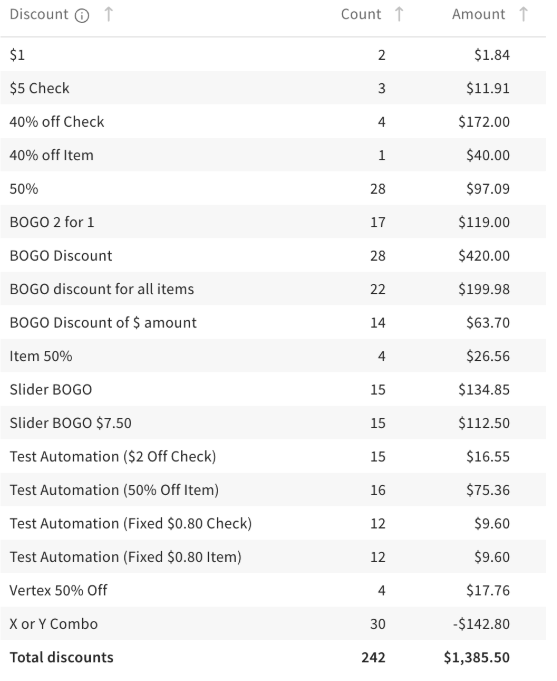
The Discounts Summary section of the Discounts report in Toast Web (Reports > Cash & loss management > Discounts report) includes the following details when your platform provides them:
-
Discount name
-
Check discount amount
-
Number of discounts for the specified time range
-
Cumulative discount total
The image below shows an example of a discounts summary report with the information described in the list above.
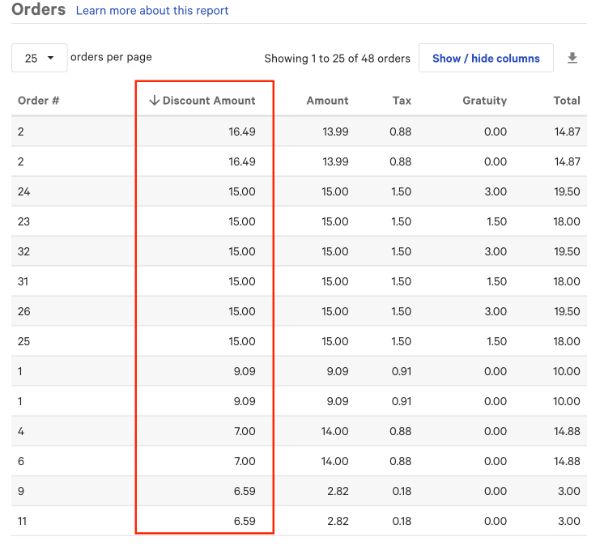
The Orders report in Toast Web (Reports > Sales > Orders) includes the total discount applied when this amount is provided by your platform. The image below shows the Discount Amount as it appears in the Orders report.
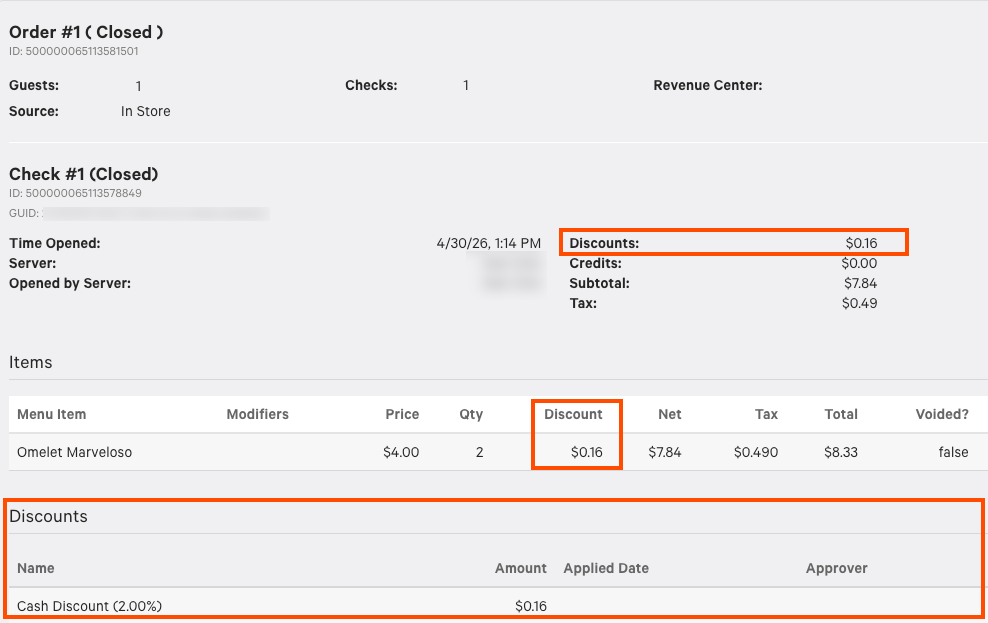
The Orders details report in Toast Web (Reports > Sales > Orders details) includes the following values when they are provided by your platform:
-
Total Discount Amount
-
Pre-Discount Price
-
External Price Amount
-
Discount Name
-
Check Discount Amount
-
Item Discount Amount
The image below shows an example of the Order details report with these values.
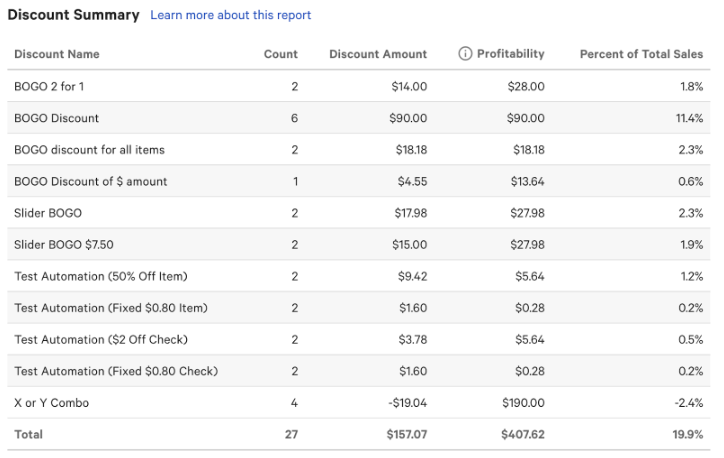
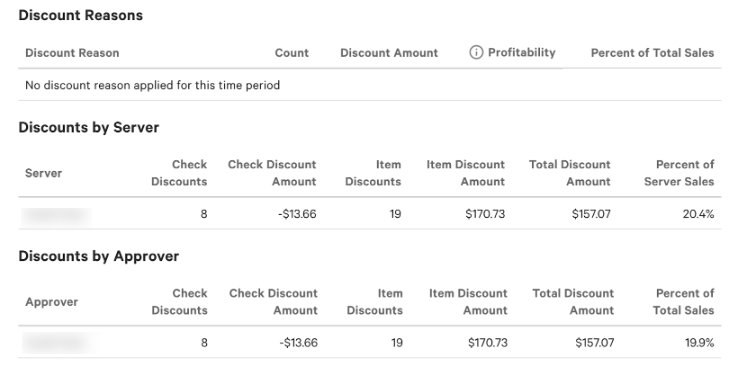
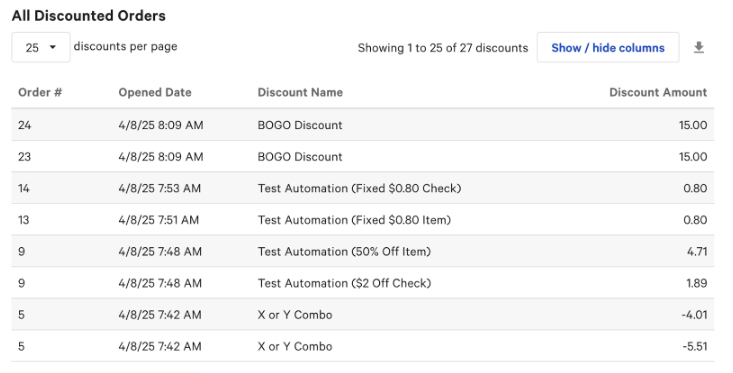
The Discounts report includes the following information when it is provided by your platform:
-
Discount Summary
-
Discount Reasons
-
Discounts by Server
-
Discounts by Approver
-
Discount Name
-
Check Discount Amount
-
Item Discount Amount
-
Pre-Discount Amount
-
Pre-Discount Price
The images below show examples of the Discounts report with the above information.
The following list describes specific limitations when creating a marketplace facilitator order.
-
Marketplace facilitator orders can only be created using the
/ordersendpoint of the orders API. -
Marketplace facilitator orders must contain only a single check.
-
Marketplace facilitator orders do not support service charges. Orders that include
appliedServiceChargesfail with error23066: Service charges are not supported on orders with taxes and externalPriceAmount. -
Marketplace facilitator orders do not support discounts on modifiers.
-
Marketplace facilitator orders don't support multiple discounts at the check or item level. Each order can have up to one item-level discount per menu item and up to one check-level discount.
-
Discounts are available only to ordering services that Toast has enabled for discounts on marketplace facilitator orders. Other ordering services receive error
26067: appliedDiscounts are not supported on orders with taxes and externalPriceAmountfor any order that includesappliedDiscounts. -
Marketplace facilitator orders that use the
facilitatorCollectAndRemitTaxOrdervalue must not includeexternalPriceAmountvalues. These orders follow the standard discount rules. For more information, see Working with order discounts.
The table below describes the different errors you may see when
creating a marketplace facilitator order with the orders API. The
values below are the code and developerMessage
elements in the orders API errorMessage response.
For more information about Toast API error responses, see API responses and errors
| Error code | Error message |
|---|---|
10025 |
name in AppliedDiscount is
response only.
|
10025 |
nonTaxDiscountAmount in
AppliedDiscount is response only.
|
10025 |
Applied discount name is longer than 255 characters. |
10025 |
externalPriceAmount in
Selection is not permitted.
|
10025 |
totalAmount in Check is
response only.
|
10025 |
netAmount in Check is response
only.
|
10025 |
totalDiscountAmount in Check is
response only.
|
23066 |
Service charges are not supported on orders with taxes
and externalPriceAmount.
|
23070 |
Externally priced discounts are not allowed. |
23071 |
Invalid externally priced discount. |
23072 |
Applied discount transactions are not supported on orders
with taxes and externalPriceAmount.
|
23073 |
Applied discounts are not supported on modifiers. |
23074 |
AppliedDiscount.discountAmount value should
be greater than zero.
|
23074 |
AppliedDiscount.nonTaxDiscountAmount value
should be greater than zero.
|
23074 |
Selection.externalPriceAmount value should
be greater than zero.
|
23074 |
Selection.discount value should be greater
than zero.
|
23074 |
Selection.preDiscountPrice value should be
greater than zero.
|
23074 |
Check.totalDiscountAmount value should be
greater than zero.
|
23074 |
Check.preDiscountAmount value should be
greater than zero.
|
23074 |
Check.discountAmount value should be greater
than zero.
|
23074 |
Modifier.price value should be greater than
zero.
|
23074 |
Order.totalDiscountAmount value should be
greater than zero.
|
23074 |
Order.preDiscountAmount value should be
greater than zero.
|
23074 |
Order.discountAmount value should be greater
than zero.
|
23075 |
Check.netAmount value should be greater than
or equal to zero.
|
23075 |
Check.totalAmount value should be greater
than or equal to zero.
|
23075 |
Check.preDiscountAmount value should be
greater than or equal to zero.
|
23075 |
Order.netAmount value should be greater than
or equal to zero.
|
23075 |
Order.totalAmount value should be greater
than or equal to zero.
|
23075 |
Order.preDiscountAmount value should be
greater than or equal to zero.
|
23076 |
Selection.discount value should be zero.
Selection does not have any discounts.
|
23076 |
Modifier.discount value should be zero.
Modifier does not contain any discounts.
|
23076 |
Check.discountAmount value should be zero.
Check does not have any discounts.
|
23076 |
Check.totalDiscountAmount value should be
zero. Check does not have any discounts.
|
23076 |
Order.discountAmount value should be zero.
Order does not have any discounts.
|
23076 |
Order.totalDiscountAmount value should be
zero. Order does not have any discounts.
|
23077 |
AppliedDiscount.name value is
required.
|
23077 |
AppliedDiscount.discountAmount value is
required.
|
23077 |
AppliedDiscount.nonTaxDiscountAmount value
is required.
|
23077 |
Selection.externalPriceAmount value is
required.
|
23077 |
Selection.menuItemPrice value is
required.
|
23077 |
Selection.price value is required.
|
23077 |
Selection.preDiscountPrice value is
required.
|
23077 |
Modifier.externalPriceAmount value is
required.
|
23077 |
Modifier.menuItemPrice value is
required.
|
23077 |
Modifier.price value is required.
|
23077 |
Check.netAmount value is required.
|
23077 |
Check.totalAmount value is required.
|
23077 |
Check.discountAmount value is
required.
|
23077 |
Check.totalDiscountAmount value is
required.
|
23077 |
Check.preDiscountAmount value is
required.
|
23077 |
Order.netAmount value is required.
|
23077 |
Order.totalAmount value is required.
|
23077 |
Order.discountAmount value is
required.
|
23077 |
Order.totalDiscountAmount value is
required.
|
23077 |
Order.preDiscountAmount value is
required.
|
23078 |
Multiple discounts are not supported on selection level. |
23078 |
Multiple discounts are not supported on check level. |
23079 |
Externally priced order values are inconsistent:
AppliedDiscount.nonTaxDiscountAmount
{{AMOUNT}} should be less than or
equal to AppliedDiscount.discountAmount
{{AMOUNT}}.
|
23079 |
Externally priced order values are inconsistent:
Selection.discount
{{AMOUNT}} should be equal to
AppliedDiscount.nonTaxDiscountAmount
{{AMOUNT}}.
|
23079 |
Externally priced order values are inconsistent:
Selection.discount
{{AMOUNT}} should be less than or
equal to Selection.preDiscountPrice
{{AMOUNT}}.
|
23079 |
Externally priced order values are inconsistent:
Selection.preDiscountPrice
{{AMOUNT}} should be equal to
Selection.externalPriceAmount
{{AMOUNT}} plus sum of all
Modifier.preDiscountPrice
{{AMOUNT}}.
|
23079 |
Externally priced order values are inconsistent:
Selection.price
{{AMOUNT}} should be equal to
Selection.preDiscountPrice
{{AMOUNT}} minus
Selection.discount
{{AMOUNT}}.
|
23079 |
Externally priced order values are inconsistent:
Selection.price
{{AMOUNT}} should be less than
Selection.preDiscountPrice
{{AMOUNT}} minus
Selection.discount
{{AMOUNT}}. Check level discount
should be distributed among selections.
|
23079 |
Externally priced order values are inconsistent:
Modifier.preDiscountPrice
{{AMOUNT}} should be equal to
Modifier.externalPriceAmount
{{AMOUNT}} plus sum of all
Modifier.preDiscountPrice
{{AMOUNT}}.
|
23079 |
Externally priced order values are inconsistent:
Modifier.preDiscountPrice
{{AMOUNT}} should be equal to
Modifier.price
{{AMOUNT}}.
|
23079 |
Externally priced order values are inconsistent:
Check.discountAmount
{{AMOUNT}} should be equal to
AppliedDiscount.nonTaxDiscountAmount
{{AMOUNT}}.
|
23079 |
Externally priced order values are inconsistent:
Check.totalDiscountAmount
{{AMOUNT}} should be equal to
Check.discountAmount
{{AMOUNT}} plus sum of all
Selection.discount
{{AMOUNT}}.
|
23079 |
Externally priced order values are inconsistent:
Check.totalDiscountAmount
{{AMOUNT}} should be less than or
equal to Check.preDiscountAmount
{{AMOUNT}}.
|
23079 |
Externally priced order values are inconsistent:
Check.preDiscountAmount
{{AMOUNT}} should be equal to sum of
all Selection.preDiscountPrice
{{AMOUNT}}.
|
23079 |
Externally priced order values are inconsistent:
Check.netAmount
{{AMOUNT}} should be equal to
Check.preDiscountAmount
{{AMOUNT}} minus
Check.totalDiscountAmount
{{AMOUNT}}.
|
23079 |
Externally priced order values are inconsistent:
Check.netAmount
{{AMOUNT}} should be equal to
Selection.price
{{AMOUNT}}.
|
23079 |
Externally priced order values are inconsistent:
Check.totalAmount
{{AMOUNT}} should be equal to
Check.netAmount
{{AMOUNT}} plus
Check.taxAmount
{{AMOUNT}} plus
Check.tipAmount
{{AMOUNT}}.
|
23079 |
Externally priced order values are inconsistent:
Order.discountAmount
{{AMOUNT}} should be equal to sum of
all Check.discountAmount
{{AMOUNT}}.
|
23079 |
Externally priced order values are inconsistent:
Order.totalDiscountAmount
{{AMOUNT}} should be equal to sum of
all Check.totalDiscountAmount
{{AMOUNT}}.
|
23079 |
Externally priced order values are inconsistent:
Order.preDiscountAmount
{{AMOUNT}} should be equal to sum of
all Check.preDiscountAmount
{{AMOUNT}}.
|
23079 |
Externally priced order values are inconsistent:
Order.netAmount
{{AMOUNT}} should be equal to sum of
all Check.netAmount
{{AMOUNT}}.
|
23079 |
Externally priced order values are inconsistent:
Order.totalAmount
{{AMOUNT}} should be equal to sum of
all Check.totalAmount
{{AMOUNT}}.
|
23079 |
Externally priced order values are inconsistent:
Order.taxAmount
{{AMOUNT}} should be equal to sum of
all Check.taxAmount
{{AMOUNT}}.
|
23079 |
Externally priced order values are inconsistent:
Order.tipAmount
{{AMOUNT}} should be equal to sum of
all Check.tipAmount
{{AMOUNT}}.
|
23081 |
Applied discounts are not supported on negative-priced items. |
26067 |
appliedDiscounts are not supported on orders
with taxes and externalPriceAmount.
|