|
Note |
|
Cash rounding is in limited release and is only available for Toast POS locations in the United States. |
Cash rounding simplifies cash transactions by rounding the total due. This feature is designed to accommodate locations where pennies have been withdrawn from circulation or where local regulations require cash rounding.
Cash rounding only applies to cash payments and adjusts the total amount due. The adjustment is applied after taxes and discounts, making it a nontaxable cash drawer adjustment.
|
Important |
|
You are responsible for your own compliance with laws and regulations, including any applicable to cash adjustment practices. You are also solely responsible for informing your customers about any cash adjustment or related business practices. |
The following sections describe the cash rounding process.
You can use one of three rounding options:
-
Always down to the nearest $.05: The guest's total is rounded down, so the guest pays less and the location loses the difference.
-
Always up to the nearest $.05: The guest's total is rounded up, so the guest pays more and the location keeps the difference.
-
To the nearest $.05: The guest's total is rounded to the nearest $0.05, so the amount paid can be slightly more or less depending on the total.
|
Note |
|
If guests pay with exact change, their check total is not rounded. |
Cash rounding is applied to the total due. This means:
-
The guest's check is calculated normally, including all items, modifiers, taxes, and any other charges.
-
If the total due is not a multiple of $0.05, the Toast platform rounds the total based on your selected rounding option.
-
The difference between the exact total due and the rounded amount collected from the guest is recorded as a cash rounding service charge.
The following examples describe how cash rounding works for each rounding option.
Always down to the nearest $.05
A guest's check total is $6.03 and a cash payment of $10.00 is made. If your location uses Always down to the nearest $.05:
-
The Toast platform rounds the $6.03 total due down to $6.00.
-
Your employee collects $10.00 and gives the guest $4.00 in change.
-
The cash rounding service charge of -$0.03 appears as a negative amount in your reporting since your location gave back $0.03 to the guest.
Always up to the nearest $.05
A guest's check total is $6.03 and a cash payment of $10.00 is made. If your location uses Always up to the nearest $.05:
-
The Toast platform rounds the $6.03 total due up to $6.05.
-
Your employee collects $10.00 and gives the guest $3.95 in change.
-
The cash rounding service charge of $0.02 appears as a positive amount in your reporting since your location collected an extra $0.02.
To the nearest $.05
A guest's check total is $6.03 and a cash payment of $10.00 is made. If your location uses To the nearest $.05:
-
The Toast platform rounds the $6.03 total due up to $6.05 because when rounding $0.03 to the nearest nickel, $0.03 is closer to $0.05 than to $0.00.
-
Your employee collects $10.00 and gives the guest $3.95 in change.
-
The cash rounding service charge of $0.02 appears as a positive amount in your reporting since your location collected an extra $0.02.
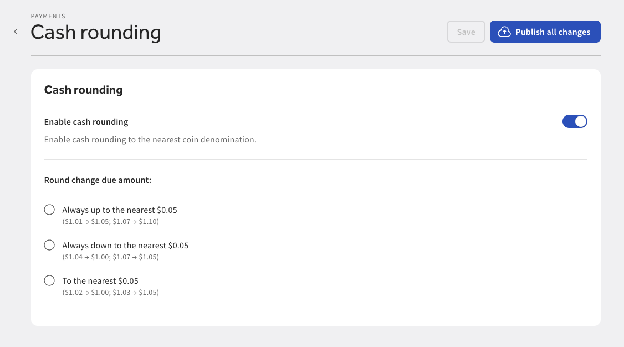
In Toast Web, you can enable cash rounding, and select a cash rounding option for your location.
To set up cash rounding
-
Go to Finance > Related > Settings > Cash Rounding.
-
Toggle the Enable cash rounding setting to On.
-
Choose a rounding option:
-
Always down to the nearest $.05: The total due is rounded down, the guest pays less and the location loses the difference. For example, if the total due is $6.03, the guest pays $6.00 and the location loses $0.03.
-
Always up to the nearest $.05: The total due is rounded up, the guest pays more and the location keeps the difference. For example, if the total due is $6.03, the guest pays $6.05 and the location keeps the extra $0.02.
-
To the nearest $.05: The total due is rounded to the nearest $0.05 based on standard rounding rules. This means:
-
$0.01 and $0.02 round down to $0.00
-
$0.03 and $0.04 round up to $0.05
-
$0.06 and $0.07 round down to $0.05
-
$0.08 and $0.09 round up to $0.10
-
For example, a total due of $6.08 becomes $6.10 (rounded up), while a total due of $6.06 becomes $6.05 (rounded down).
-
-
Select Save to save your changes.
-
Select Publish all changes to publish changes for your location.
When cash rounding is used, guests see information about your location's rounding policy in several places throughout their payment experience.
To maintain transparency, the Toast platform displays disclaimers about cash rounding on guest-facing surfaces:
-
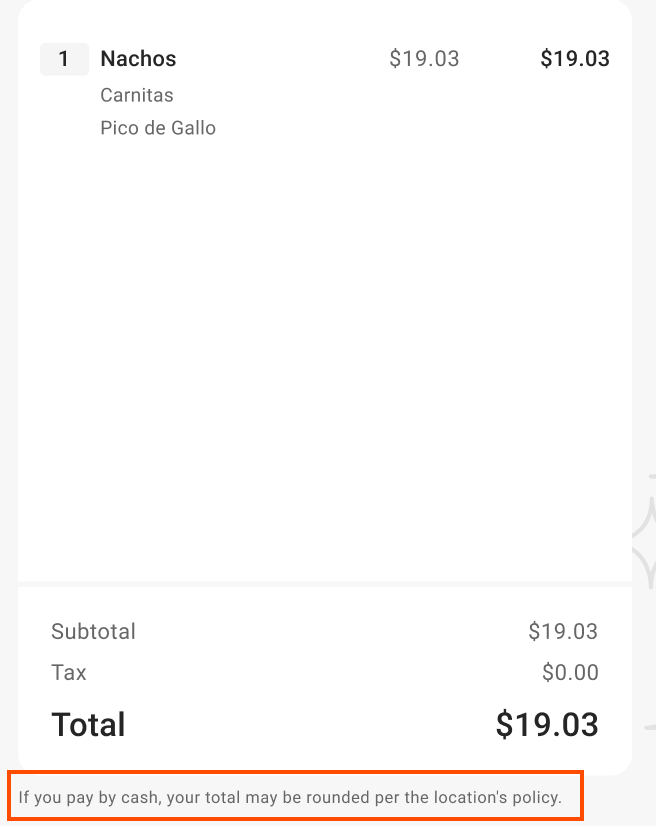
Guest-facing display: The display shows a disclaimer at the bottom of the screen that reads: "If you pay by cash, your total may be rounded per this location's policy."
-
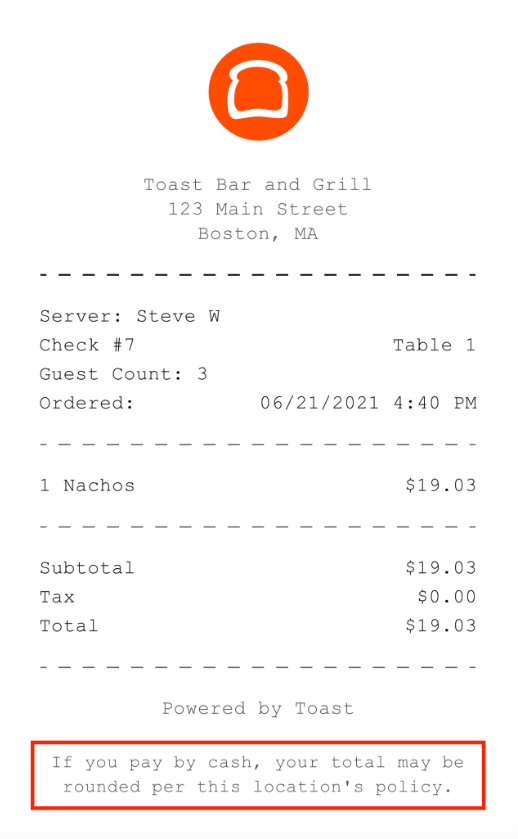
Pre-payment receipt: The receipt shows a disclaimer before the guest completes the payment that reads: "If you pay by cash, your total may be rounded per this location's policy."
-
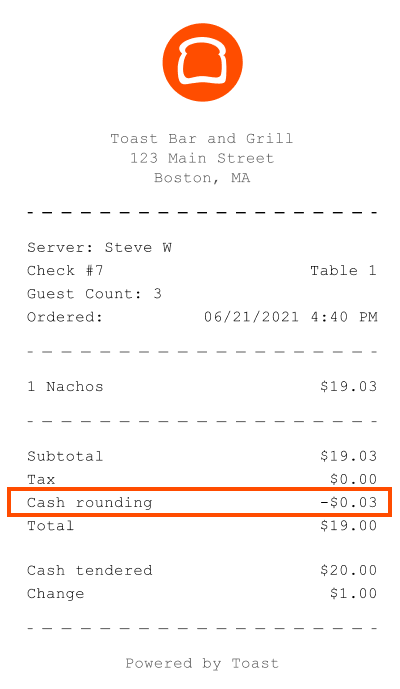
Post-payment receipt: After payment, the receipt shows a Cash rounding line item that displays the amount of the rounding adjustment.
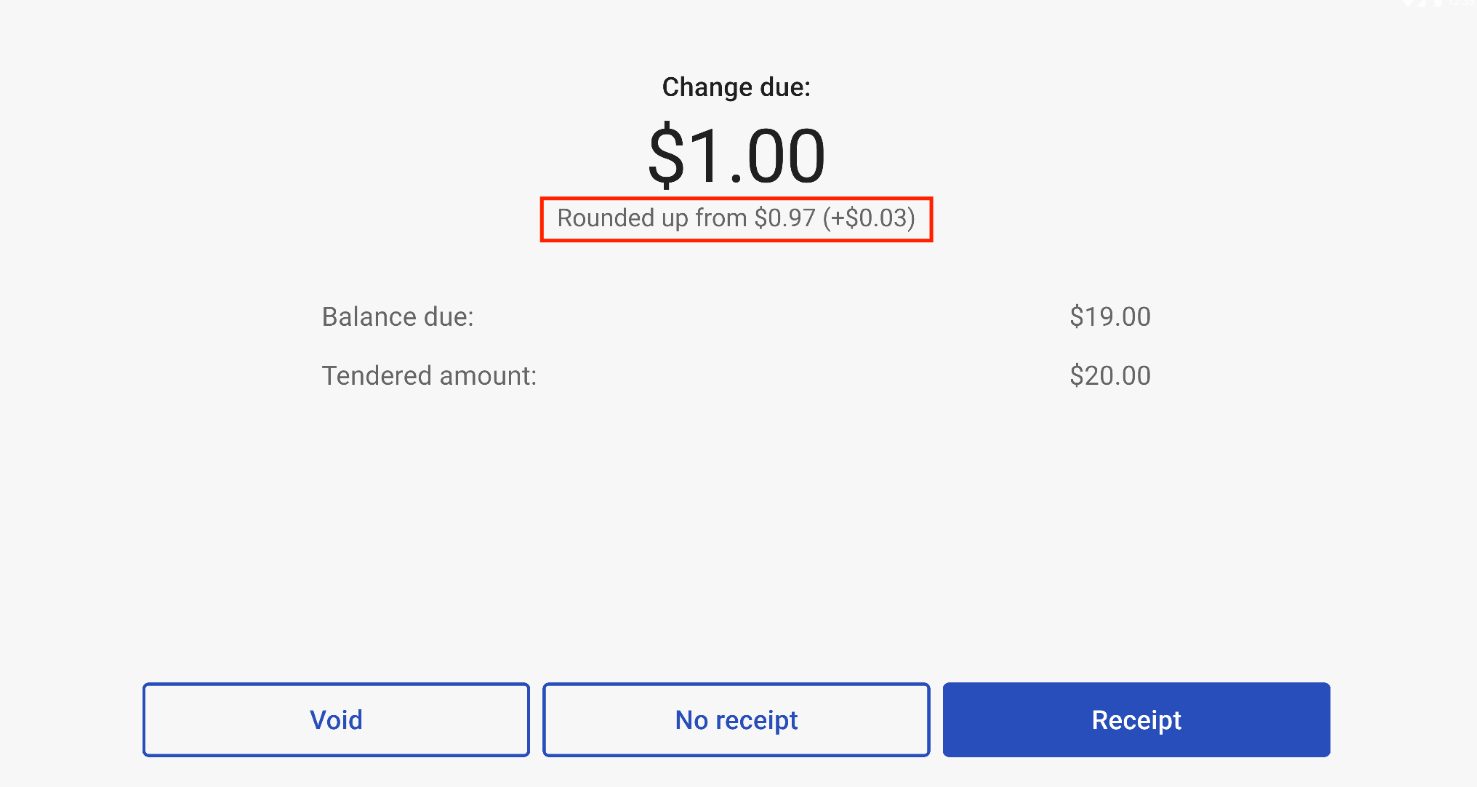
The sections below explain how cash rounding adjustments appear in your Toast reports.
You can track your cash rounding adjustments in the Sales summary report in Toast Web. Access this report by going to Reports > Sales summary. The report includes a Cash rounding line item under the Revenue summary section.
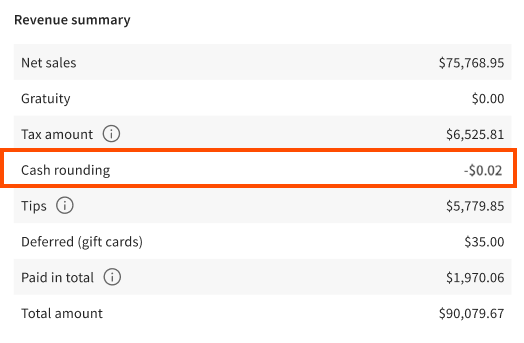
The Cash rounding line item shows the total amount your location gained or lost from rounding adjustments during the selected time period. This helps you understand the overall impact of your rounding option. The rounding options below describe how your reports are affected when your location uses a cash rounding option.
-
Always round down to nearest $.05: A negative number indicates that your location gave more change back to guests.. This happens when using the Always round down to nearest $.05 option. For example, if you always round down, this number will be negative because you're giving guests additional cents with each cash transaction.
-
Always round up to nearest $.05: A positive number indicates that your location kept more cash than the exact change due. This happens when using the Always round up to nearest $.05 rounding option. For example, if you always round up, this number will be positive because you're keeping a few cents from each cash transaction.
-
To the nearest $.05: A number close to zero indicates your location both gave back change to guests and kept more cash than the exact change due, depending on the cash rounding adjustment. For example, if you round up or down depending on the exact change due, the balancing of positive and negative cash rounding is closer to zero.
To track cash rounding for individual orders, add the Cash Rounding column to your Orders report.
To add the Cash Rounding column to the Orders report
-
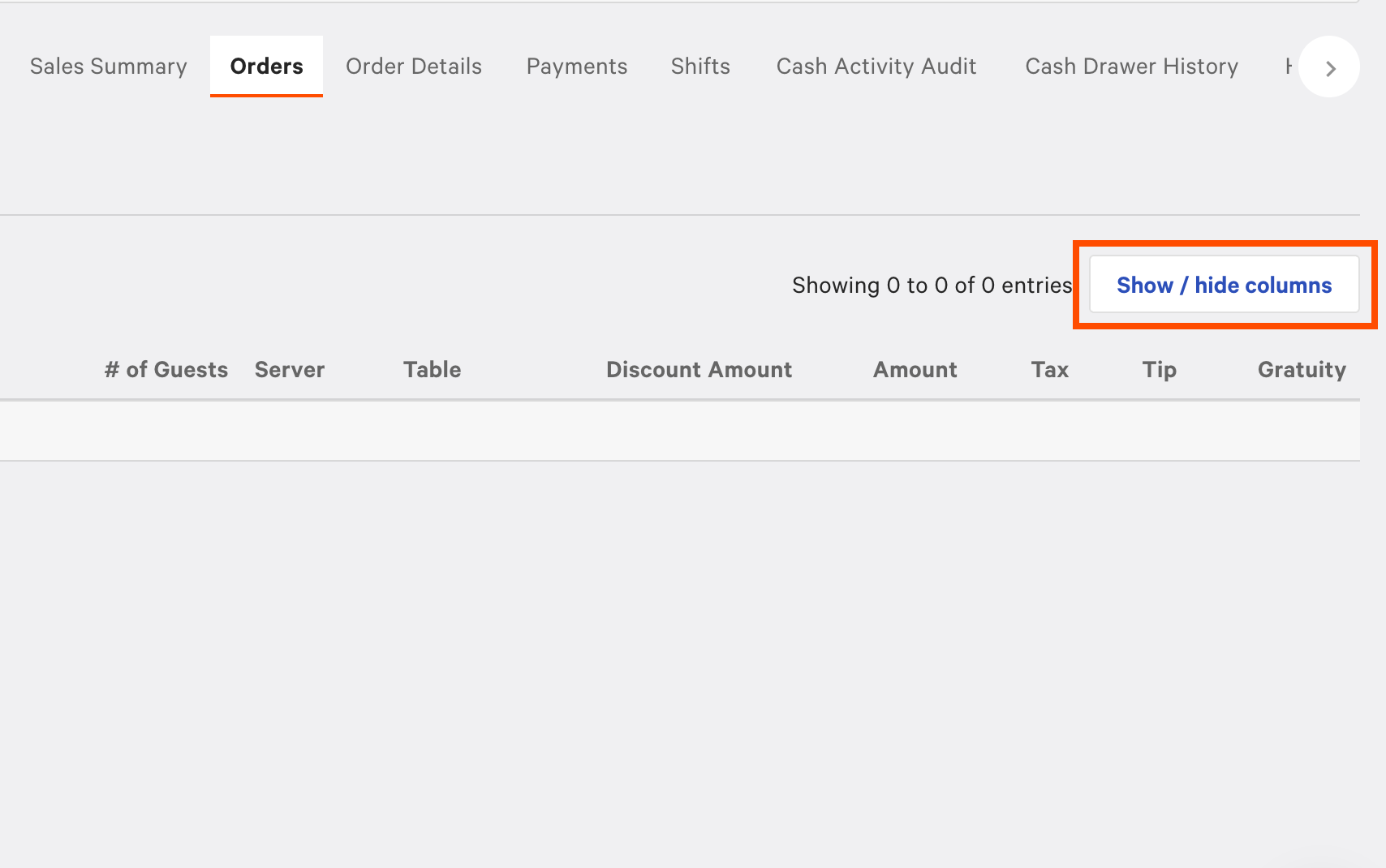
Go to Reports > Sales > Orders.
-
Select Show / hide columns.
-
Select Cash Rounding from the available columns.
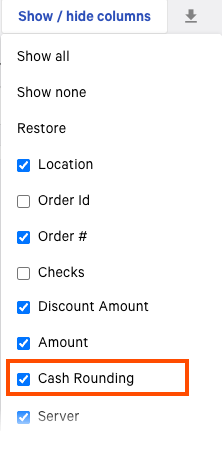
The Cash Rounding column shows the adjustment amount for each cash order. Positive values indicate your location kept extra change, while negative values indicate you gave extra change back to guests.
When you view the Order Details report in Toast Web (Reports > Sales > Order details), the report includes a Cash Rounding item beneath the Tax total that shows:
-
The exact amount rounded.
-
Whether the adjustment favored your location (positive) or the guest (negative).
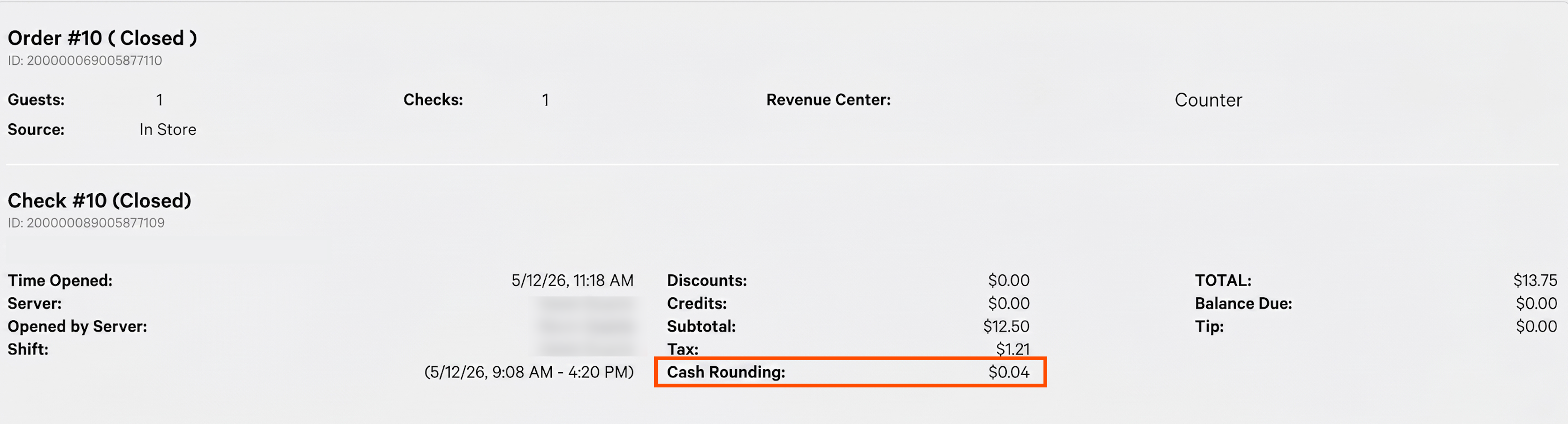
This separation helps you reconcile cash transactions and understand the exact impact of your rounding option on individual orders. The cash rounding amount is not included in the order subtotal.
|
Note |
|
The Cash Rounding line doesn't appear for non-cash orders. |
You can round cash tips if you set the Cash rounding setting in Employees > Shift review > Advanced shift review setup to Always up to the nearest $.05. After you configure non-cash tips to be paid out from the cash drawer, and turn on cash rounding for tips, tip totals are rounded up to the nearest $0.05. For example, tips of $11.13 round to $11.15. For more information about cash rounding tips, see Configuring cash rounding for tip payouts.
When you enable cash rounding on tips, you'll see the rounding amounts in three different reports:
-
Shift review report (Z report): Employees can see how much their tips were rounded up.
-
Manager shift review: You can see the rounding adjustment for each employee during cash out.
-
Sales summary report: This report includes a Cash rounding from tipouts line item that shows the total amount your location paid out from tip rounding.