You can view your active and archived house accounts in Toast Web. Go to Finance > Payments > House accounts to open the Accounts page. On the Accounts page, you can view the following information:
-
Total number of house accounts
-
Total outstanding balance of house accounts
-
List of active and archived house accounts
On the Accounts page, you can complete the following actions:
-
Bulk adjust house account balances. For more information, see Bulk adjust house account balances.
-
Choose to create either a single or multiple house accounts
-
Search for a house account by name or account number
-
Use the date picker to search for active house accounts with transactions created within a time range
Note
If a time range is selected, this populates the Total Spend column. The total spend is the total amount charged to a house account and the total amount invoiced to the account. For more information, see Paying for orders with a house account.
-
Filter house accounts by outstanding balance or last transaction date
-
Show and hide various table column options
-
Download house accounts table details
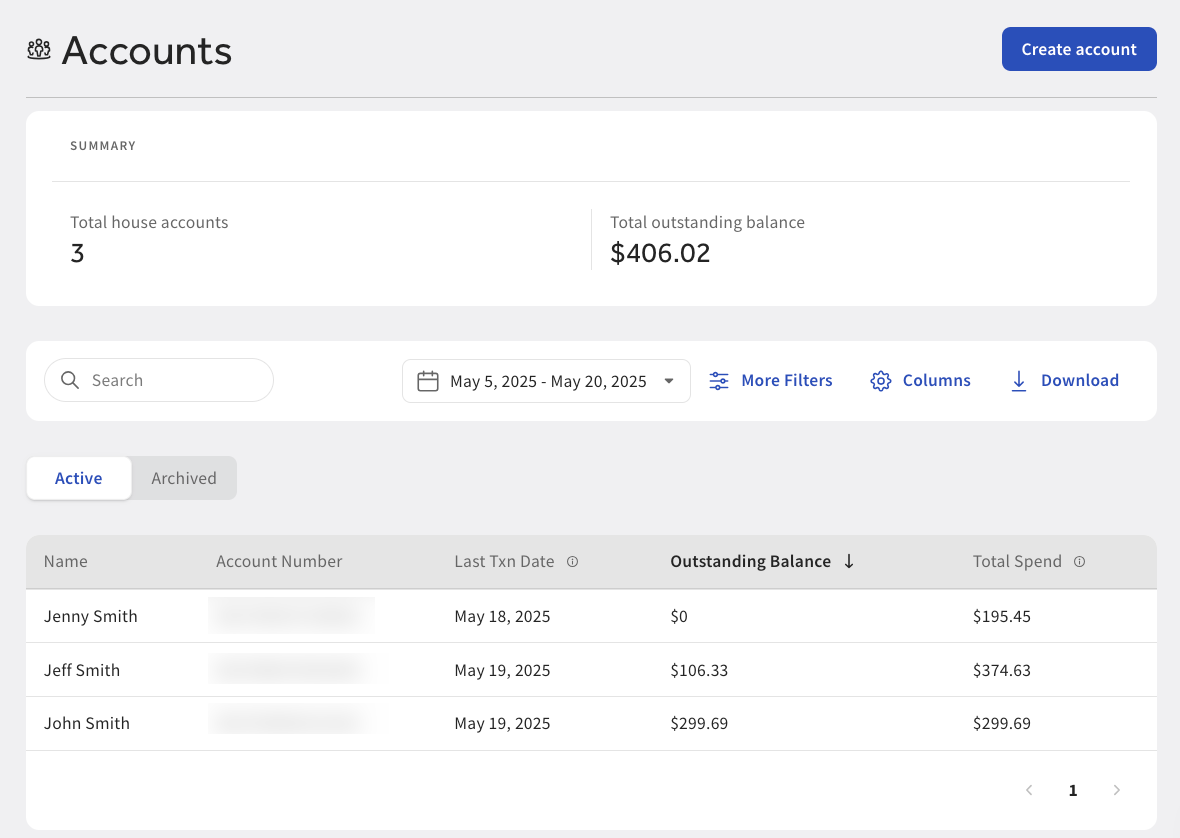
You can choose to bulk adjust house account balances on the Accounts page in Toast Web.
To bulk adjust house account balances
-
Go to Finance > Payments > House accounts > Accounts to open the Accounts page.
-
On the Accounts page, check the box next to each house account you want to adjust the balance for. This displays a dialog.
-
Select the Adjust balances link in the dialog. This opens the Adjust balances dialog.
-
In the Adjust balances dialog, choose to adjust house account balances to $0.00 or to a custom amount.
-
Select the Continue button to save your changes and close the dialog.
-
The Accounts page displays the new outstanding balance that applies to the selected house accounts. Add a note for your accounting records as needed.
-
Select the Apply adjustments button to apply the adjustment. The Accounts page displays the house accounts with the new balances.